Showing posts with label Silhouette CAMEO. Show all posts

Monday, April 15, 2019

Winner & Miss Kate Project

Welcome to my blog!

I posted some Easter Projects last week featuring Miss Kate Cuttables Easter Fun Paper Collection and matching Easter Fun Die Cuts. 


Miss Kate has generously offered a set to giveway on my blog!
I had my son with his newly broken arm :( pick the winner.

AND THE WINNER IS...
MIGDALIA
CONGRATS! I'll be in touch to get your address info.

+++++

Today It's my turn to share on my the Miss Kate Cuttable's Blog.
Before we check out the project just a reminder to grab the Freebie of the Week!

I made a wedding invitation shadowbox for my project.

I put a patterned paper as my background. I then cut the Decorative Square SVG.

I used the offset on my Cameo to create a background. Then I offset it again.
I added foam core under both shapes to add dimension.

I then added foam core under the invite and finished off with some embellishments.

Thanks for stopping by today! Make sure you sign up to receive my emails so you don't miss the next giveaway!

Monday, April 8, 2019

Bunny Challenge!

It's Challenge time for Miss Kate Cuttables and the theme this month is all about Bunnies!


I used this Easter Bunny SVG for my project.


I cut the bunny at 11.5" high so it just fit on my 12 x 12 Cameo mat.
I did not cut the grass or the egg. I wanted the bunny to hold a plastic egg so I can load it up with a few chocolates and some CA$H.

I secured the egg with some tape.
Here's another look at the bunny:

Stop by the blog to check out the design team Bunny Projects. They're amazing!


Monday, March 18, 2019

Easter Decor

It's my turn on the Miss Kate Cuttables Blog today and I'm sharing a fun Easter Decor project. Who's ready for Spring? I AM!

Before we check out my project don't forget to grab the Freebie of the Day from the Miss Kate Cuttables Website.

Here's my Easter Decor Project:


First thing I did was paint my wooden round. I have been wanting to try the buffalo plaid style for a really long time and finally gave it a try! (Search YouTube for tutorials)
Here's a look at my plaid pattern:


I then planned out my wording and the leaf accents...I wanted to keep them simple.
I used just the "Easter" portion from this Easter Title.

I used the only the green leaf layer from this Spring Wreath SVG.

I placed just the elements I wanted to use in my cameo software and placed the Easter on top of the wreath and subtracted the wreath so they would not overlap. I cut this from vinyl, applied it to the sign and used chalk paint and a foam brush to add the green and pink. 

Since the background pattern was a bit busy I was not happy with the contrast of the Easter and leaves in the wreath. I first decided to do a solid fine point sharpie around the elements then decided to do a line/dot pattern. It's a bit less forgiving and I like the look. 
Here's my work in progress...


I experimented at the top of my sign where I knew my flower and bow would cover up. 
I added my flower and ribbons to the top and placed it on a stand. Super happy and love the bright spring colors.


Thanks for stopping by today! 

Monday, March 11, 2019

MKC Shamrock Challenge

It's Shamrock time over on the Miss Kate Cuttables Galleria Facebook Page! Shamrocks are the theme for this month's challenge.

For my project I created a super cute St. Patrick's Day shadowbox!


I featured the Irish Owl but left off the balloon. You can grab him here!

I use foam core under my cuts to lift them off the background so the shadows appear.


I also used several shamrocks and layered them and added buttons as accents.
Here's a closeup:


Hope you have a Happy St. Patrick's Day this week and join in the challenge!


Monday, February 11, 2019

Mardi Gras Challenge

Hello Crafty Friends! It's challenge time over on the Miss Kate Cuttables Galleria Facebook Page. The theme for the month is Mardi Gras. 

I created a cute little card for my project using a Mardi Gras color scheme.


I used the Decorative Doily file for my card. You can grab it here!
I used two of the three layers and added a circle behind the cut to follow the shape of the card.


I added a banner and a stamped sentiment. Hope you join in the fun for this month's challenge.
Don't forget to check out the amazing design team projects on the blog.


Sunday, January 13, 2019

Love String Art

Hello Everyone! I'm sharing a new technique (for me) for my Miss Kate Cuttables design team project. I will share step by step directions. 

For my project I tried STRING ART!

I am going to share the steps I took to create the project:

STEP 1: 
I selected the SVGs. I used the envelope from the Valentine Love Letter Set.

I also used a bold font for the LOVE. You can use the bottom layer of the Valentine Uppercase Alphabet. Once I imported the SVGs into my Cameo Software I converted to dots using the rhinestone feature. I converted the lines to dots. I used .25 spacing.


STEP 2:
I cut vinyl with my Cameo. When I peeled the vinyl from the backer it left all the dots on the backer piece so it was super easy and there was no weeding needed. I applied the vinyl to my board and grabbed by hammer and nails.


STEP 3: 
I nailed in my nails. Using the holes in vinyl as my guide. 

I peeled off the vinyl when I was done nailing.

STEP 4:
I grabbed my yarn (Walmart carries this brand)

I started by securing my yarn on a corner nail and double knotting it, leave a tail. I then went around the outside edge of the design, wrappng around each nail, sort of outlining it, keeping the yarn at the bottom of nail. Once it was outlined I started randomly wrapping the yarn until it was a desired amount of coverage.
Once it was completed I repeated the outline around the shape to finish it off and tied a knot at the nail I started on.

I decided to outline my envelope with black yarn - it helped to make it pop.


This project is time consuming but it was very fun! 
I actually took some iphone videos. Here are the links on YouTube:


Thanks for stopping by today!


Monday, January 7, 2019

Under The Sea Shadowbox

Hello ~ I made a fun shadowbox over the holidays for a sweet baby named Kora.
Her picture will go in the upper right portion. I'll share the Miss Kate Cuttables files I used for the rest of the shadowbox. 


For the top portion I used the whale file.
In the bottom right of the shadowbox I used the Seahorse file.


This cute little Smiling Crab is featured at the bottom of my shadowbox.
I also used some of the seaweed from this file and the bubbles.
As additional accents I used the Underwater scene.


Please note! I decided to assemble the large piece of coral and then as I was putting together my shadowbox I decided to manually cut it and use it in a few different spots in my shadowbox.
Here are a few closeups of my shadowbox:


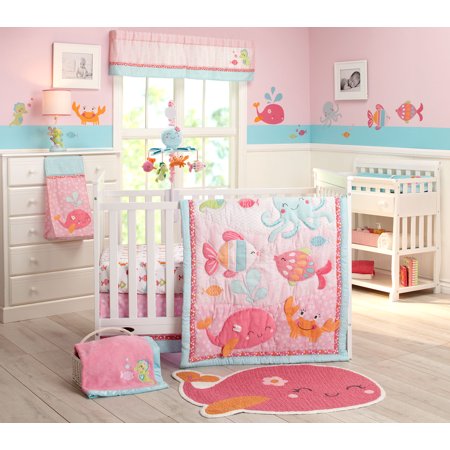
Here's a look at the bedding I was matching:

Hope you liked my shadowbox today. This will be featured as my Design Team Challenge project for Miss Kate Cuttables. The theme this month is Anything Goes! Stop over on the Galleria to join the fun. You can also check out all the design team projects on the Miss Kate Cuttables Blog.


Monday, December 17, 2018

Dasher, Dancer, Prancer...

Howdy! It's almost Christmas and I got a bit of craftiness in this weekend. It's my turn on the Miss Kate Cuttables Blog today.

Here's a festive 11x24 sign I created for my design team project: 


I also used the Flying Reindeer Set.

Here's my step by step process:
1. First I stained my board and dry brushed over the stain once it was dry

2. Next I cut the file on my Cameo out of vinyl. I weeded out the letters I wanted to paint, applied transfer tape and transferred it to the board.

3. Next I applied chalk paint.

4. Lastly I removed the vinyl.


Hope you enjoyed my project today! Merry Christmas!!